
FieldJot
Built for the field. Ready for the office. Daily jobsite reports with photos, markup and notes — captured on Android, sent as a professional PDF.
- Platform
- Android
- Version
- 1.2
- Price
- US$4.99 one-time
- Account
- Not required
- Status
- Available on Google Play
The work got done. Proving it is the hard part.
A crew documents the day already. The photos are in a camera roll with four thousand others, the notes are on the back of a delivery ticket, and the rest is in a text thread nobody can find in six months.
None of it looks like a report when a client, a general contractor or an insurer asks what happened on site. So somebody retypes it at the kitchen table at nine at night, or it never gets written and the question goes unanswered.
The existing answer was a field-management platform: per-seat pricing, an account for everyone, a rollout, and a monthly bill that keeps arriving. For a two-truck operation that needs one document per day, that is the wrong shape of solution.
Job, report, photos — then a PDF.
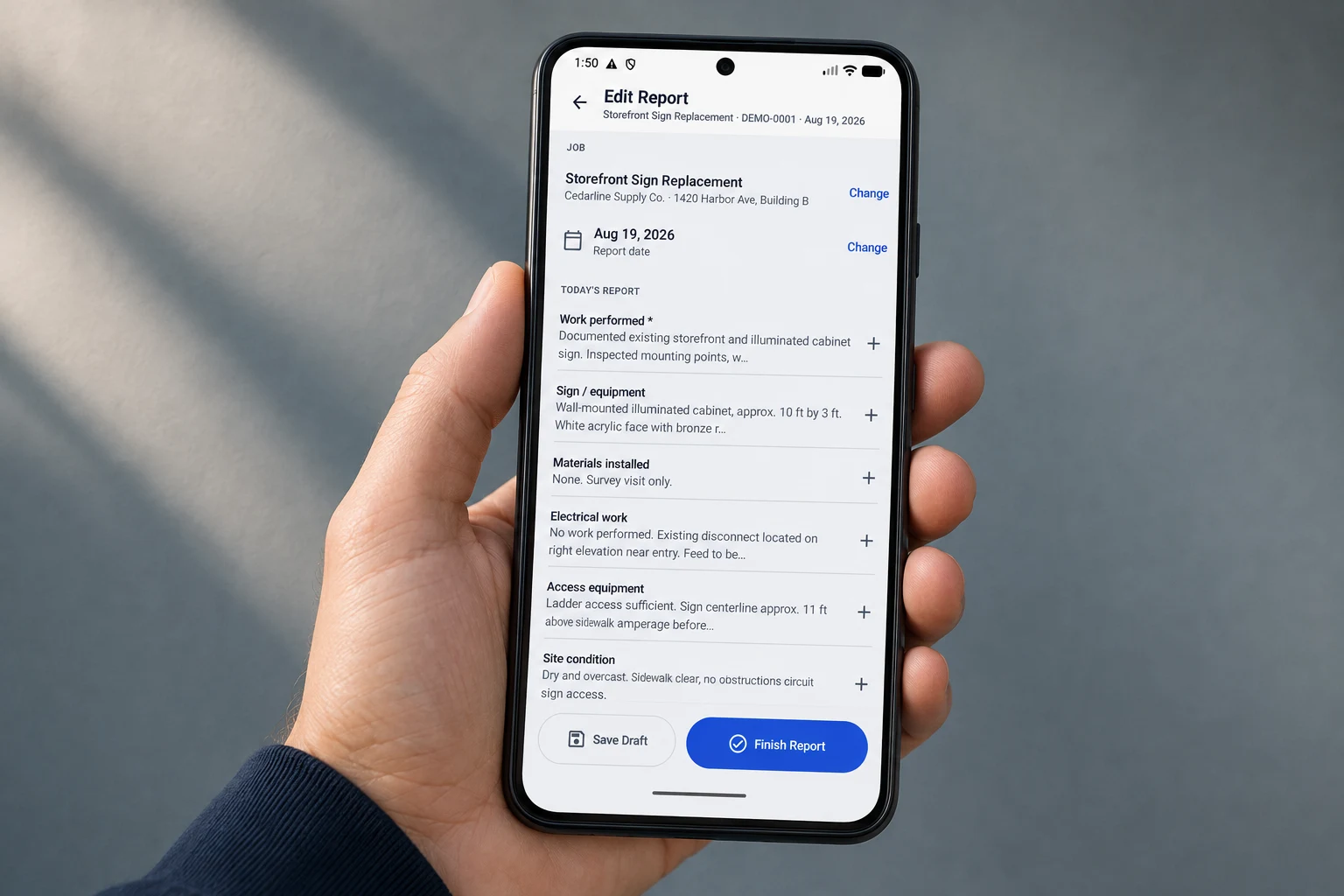
Real screens from the built app, not mockups. Start from a job, write the day in structured sections, keep it as a draft until it is right, then export.


The field half is a phone. The office half is this PDF.
A real export: job, client, date and site details, then the day’s sections, then numbered photo pages with their labels, captions and markup. It lands in a client file or a GC’s inbox as an ordinary PDF — nobody needs FieldJot to read a FieldJot report.
Northgate Sign Co. and Cedarline Supply Co. in these captures are fictional demonstration data, not customers.
What we refused to build.
- The report is structured, not a blank page. Work performed, equipment, materials, electrical, access, issues. A free-text box gets three words typed into it in the truck; named sections get filled in because the prompt is there. Anything that doesn’t apply is skipped.
- Offline is the default assumption, not a feature. Core reporting works offline — write the report, add photos, and export the PDF without a connection. Basements, new builds and steel structures are where this gets used — a report that needs a connection is a report that doesn’t get written.
- The measurement tool records; it does not measure. It draws a dimension line and prints the value you type — your tape measure does the measuring. Inferring a distance from a photograph would produce a number that looks authoritative and is sometimes wrong, on a document someone may rely on months later.
- The app has no analytics in it at all. The FieldJot Android app requires no CMMM account, has no CMMM backend for user content, and contains no ads or analytics or tracking SDKs. FieldJot does not upload your reports or photos to CMMM. That cost us usage data for our own product, and it was worth it for a tool that photographs other people’s buildings.
Where it actually is.
FieldJot 1.2 is currently US$4.99 one-time. No monthly subscription.
FieldJot is published on Google Play and available to install today. The listing carries the price, the countries it sells in and the version currently shipping — the checkable version of everything on this page.
What it deliberately does not do.
Full field-management suites solve a different problem: crews, dispatch, invoicing and back-office workflow across a whole company. FieldJot does one job.
If you need shared dispatch, multi-user accounts, records synced between office and field, invoicing, or an audit trail across projects, a complete suite is the right tool and FieldJot does not try to replace it. If your day ends with photos on a phone and a report somebody still has to write, it is aimed at you.
Straight answers.
What can I export?
Four options: the professional PDF on its own, the PDF plus your full-quality original photos, the originals alone, or an Office package — one file with the report and the originals together.
Can I move FieldJot to a new phone, or back it up?
Yes. Transfer & Backup saves everything — reports, photos, markup, and settings — into one backup file you keep wherever you trust, and can restore on this or another device. There is also a direct move: send your complete workspace to another Android phone or tablet and receive it there. The backup is a file you hold; FieldJot does not upload it to CMMM. Make one before you uninstall, reset or replace the device, because we never receive your reports and there is no copy on our side.
Is FieldJot available on iPhone?
Not today. FieldJot is an Android app and there is no iOS version. We have not announced one, so please don't buy an Android device expecting an iPhone release.
Need something like this built for your operation? FieldJot went from a real problem to a finished Android app. CMMM Studios builds apps, websites, web apps and internal tools.
Start a project