
CMMM Install Board
Install scheduling for a sign shop. An office board that assigns jobs to crews by day, and a phone view that shows an installer only their own work.
- Type
- Web application
- Stack
- Next.js 16 · TypeScript · PostgreSQL · Drizzle
- Roles
- Office, installer
- Build window
- 22–23 Aug 2026
Where the schedule actually lived.
A sign-installation operation runs on a schedule that exists in four places at once: a whiteboard in the office, a spreadsheet someone maintains, a group chat where the day gets changed, and the memory of whoever answered the phone.
None of those agree by Thursday. The cost lands on the installer, who drives to a site that moved, and on the office, which finds out at 8am.
The job was not to build a field-service platform. It was to make one schedule that the office edits and the crew reads, and to make the crew’s half small enough to use on a phone with cold hands.
Two days, two roles, one company.
The build window was two days, which decided most of the scope by itself. It also had to be genuinely multi-user from the first commit — an office user and an installer see different data, and getting that wrong is the kind of bug that is impossible to retrofit.
Patterns were carried over from an earlier internal system that already ran this operation, rebuilt rather than copied so that its known weaknesses did not come along.
An office board and a phone.
Two interfaces over one schedule, each showing only what its user can act on.
Office
A board with crew lanes down the side and days across the top, in a week view or a single day. Unscheduled jobs wait in a rail on the left; dragging one onto a lane schedules it. Dragging it again reschedules or reassigns it.
Double-booking is caught as it happens — the board flags a crew booked against itself, and an installer booked on two crews at the same time, rather than letting Thursday discover it.
Around the board: jobs, customers, crews and team management, with invites for bringing someone new in.
Field
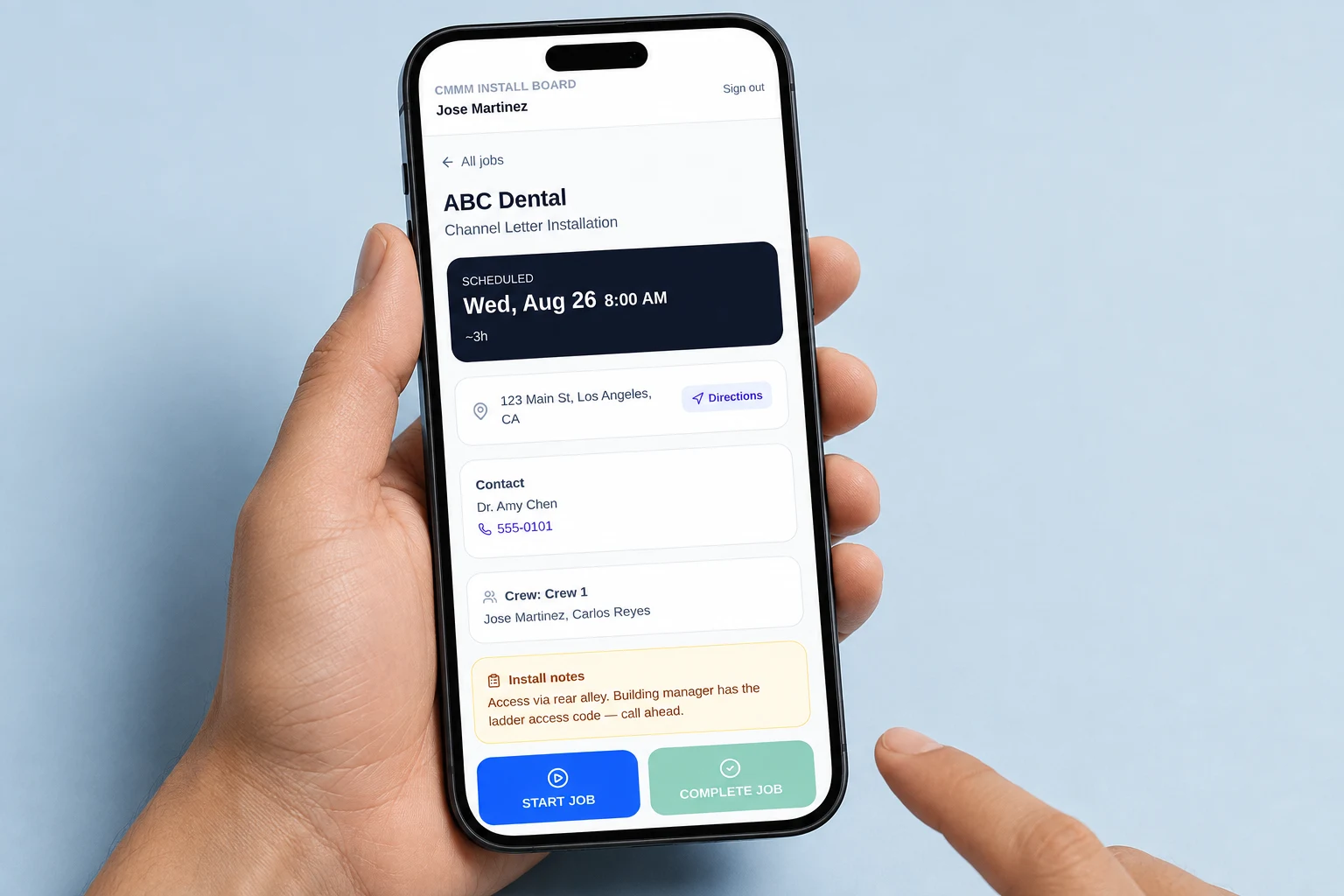
An installer logs in and lands on Today. Tapping a job gives them the address as a map link, the contact as a call link, the crew they are with, the install notes, and two buttons: start and complete. That is the entire application from the field side, and that is the point.


Both captures are of the running pilot, taken on 25 Aug 2026. The data in them is fictional demonstration data seeded from the project’s own seed script — ABC Dental, Sunrise Cafe and the installer names are invented, and the phone numbers are 555-01xx. They are not customers and not employees. The office board is described above but not pictured: capturing it needs a credential this session did not have, and an illustration of a screen is not a screenshot of one.

What two days bought.
- Installer visibility is decided on the server, every time. Which jobs an installer may see is re-derived from their crew membership and direct assignments on each request — it is not a filtered list handed to the client, and it is not the interface hiding rows. The rule itself was split out as a pure function so it could be unit-tested without a database.
- There is no authentication bypass flag. An earlier internal system had an environment switch that disabled auth for local work. That is a production incident waiting for a bad deploy, so this codebase has no such switch — not even a disabled one.
- Drag-and-drop updates optimistically and reverts on failure. Dropping a job on a crew lane moves it immediately, calls a server action in a transition, and puts the card back where it came from if the write fails. A scheduling board that lies about whether a change saved is worse than one that feels slow.
- Every drag has a keyboard-and-form equivalent. A “Schedule (no drag)” control does the same job from a plain form, so scheduling never depends on being able to execute a pointer drag.
- No GPS, no check-in log, no location history. Deliberately absent from both the schema and the code. This is a tool for knowing where the work is, not for tracking where people are.
- No money in the system at all. No invoicing, no pricing, no accounting integration. Scheduling was the problem worth solving; adding billing would have doubled the surface area and the risk for no gain in the thing being validated.
How far this actually goes.
Said plainly, because a pilot described as a product is how a reader learns to distrust the rest of the page.
- Stage
- Internal validation pilot, one organisation
- External customers
- None
- Commercial launch
- Not scheduled
- Pricing
- Not decided
- Deployed
- 23 Aug 2026, HTTPS, not indexed
- Auth
- scrypt hashing, DB session tokens, login lockout
- Tests
- 33 unit tests (Vitest)
- Not unit-tested
- Query layer and UI — verified manually
The gaps, written down.
Written down during the build rather than discovered by whoever inherits it.
Installers see today and this week, not history. A completed job scrolls out of view once its date passes. Office can still see everything. This was a simplification, and if the pilot says it hurts, it changes.
Invites are not emailed. An office user copies a link and sends it themselves. Wiring a transactional mail provider was not worth it before knowing whether the tool survives contact with a real week.
No photo or attachment upload. The obvious next feature, and deliberately out of the first build.
One latent gap is documented rather than hidden. One write path does not re-verify a crew id against the caller’s company. It is harmless in a single-organisation build and it is written down, because the time it becomes a real bug is the day someone extends this to a second company.
Have a process that only works because one person remembers it?
That is the shape of problem this was. If yours looks similar, describe it and we will tell you honestly whether software is the answer.